Title

Digital Geometry Processing
Exercise 4 - Surface Normals & Curvature
Edward Chien, edchien@bu.edu
Computer Graphics & Geometry Processing

Exercise 3 Commentary

Exercise 1

Match each curve with the corresponding curvature functions: \(k_1(s) = \frac{s^2-1}{s^2+1} ,\quad k_2(s) = s, \quad k_3(s) = s^3 - 4s, \quad k_4(s) = \sin(s)s.\)
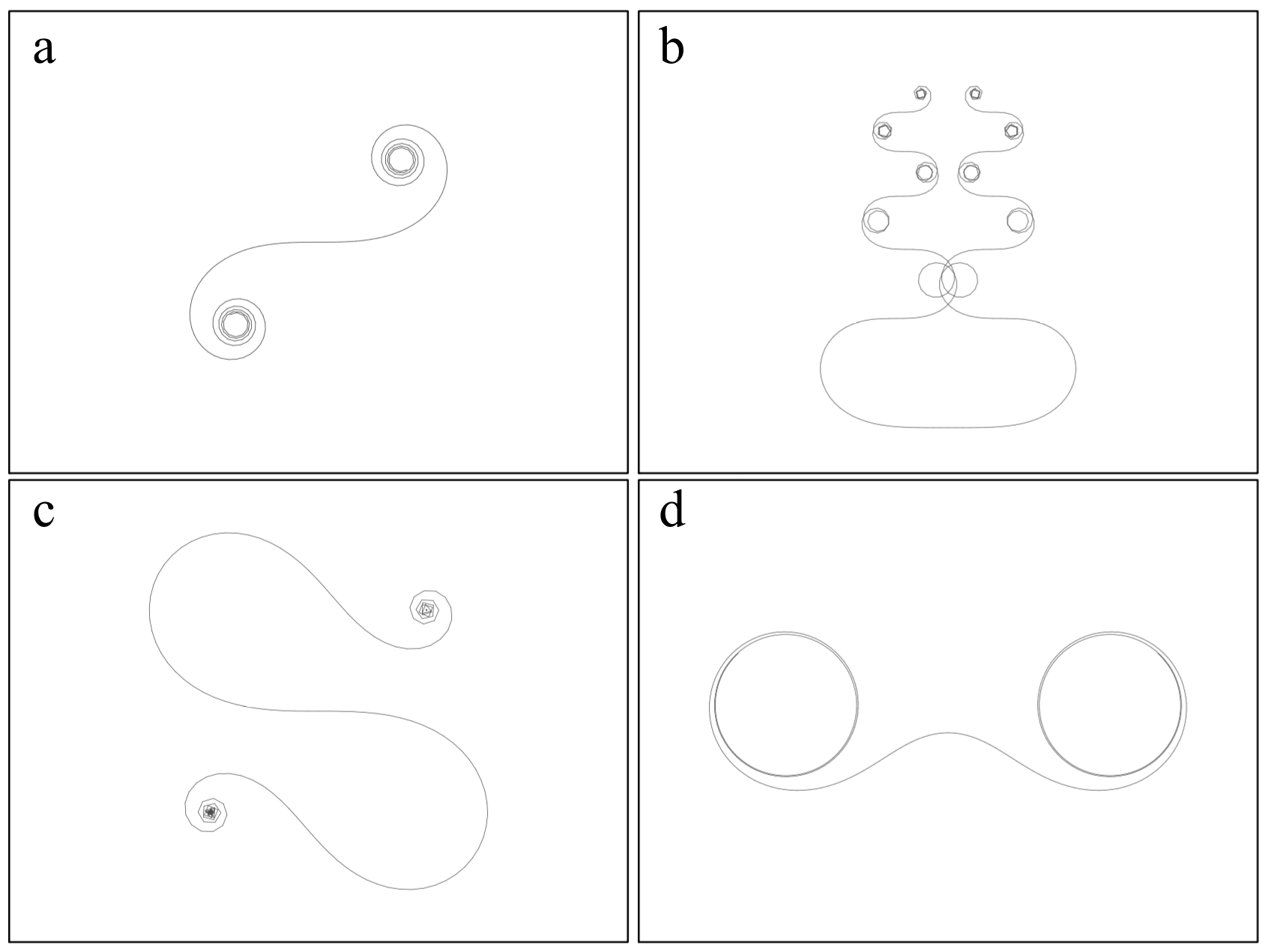
curves.png

Exercise 1 - Curve 1

  • \(k_1(s) = \frac{s^2-1}{s^2+1}\)
  • curve1.png
  • –> curve (d)
curves.png

Exercise 1 - Curve 2

  • \(\quad k_2(s) = s\)
  • curve2.png
  • -> curve (a)
curves.png

Exercise 1 - Curve 3

  • \(\quad k_3(s) = s^3 - 4s\)
  • curve3.png
  • -> curve (c)
curves.png

Exercise 1 - Curve 4

  • \(\quad k_4(s) = sin(s)s\)
  • curve4.png
  • -> curve (b)
curves.png

Exercise 2 - Golden Dome

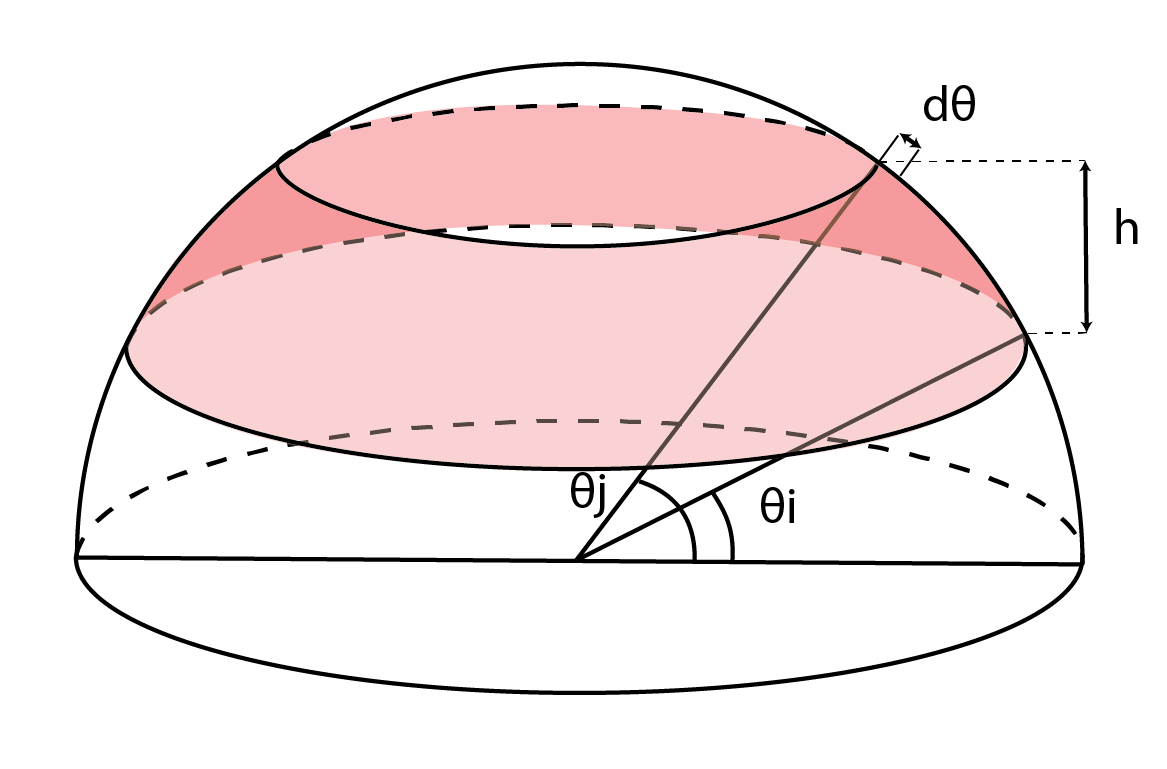
Which of Part A and Part B have the largest surface ?
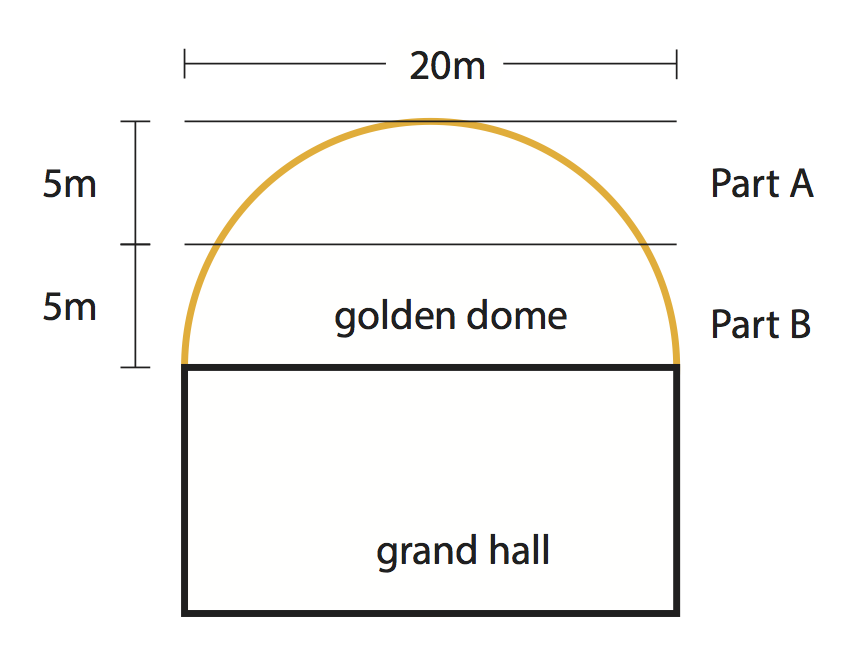
dome.png

Exercise 2 - Golden Dome

  • \(S = 2\pi r \int_{\theta_i}^{\theta_j} (r cos\theta) d\theta\)
  • \(= 2 \pi r^2 (sin(\theta_j) - sin(\theta_i))\)
  • \(= 2 \pi r^2 h\)
  • NOTE: an argument based on arc-length of cross-section is not correct. Nice try though.
dome-sol.png

Exercise 4 Information

What is a Mesh ?

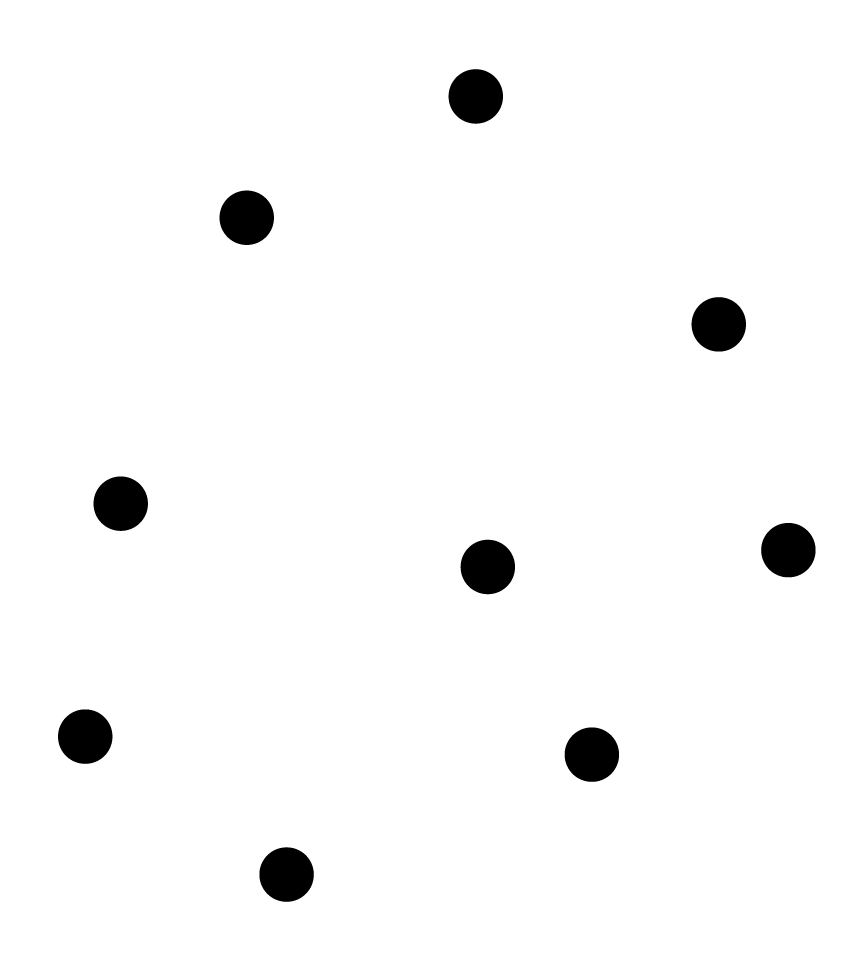
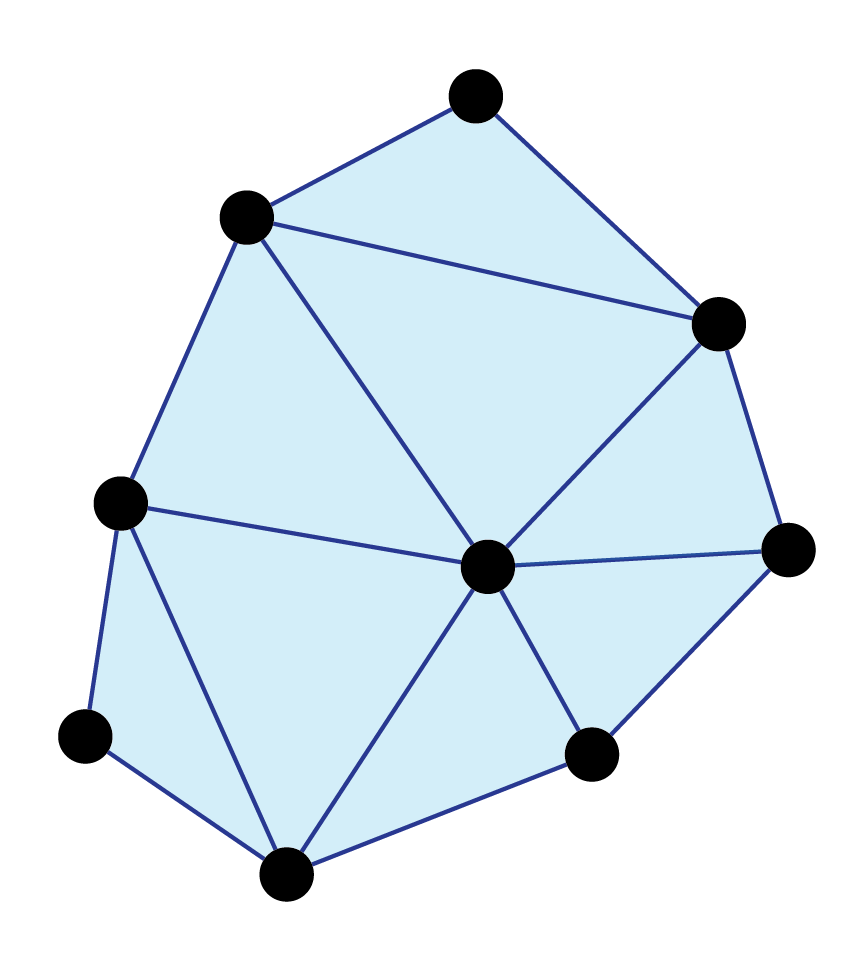
  • a “Mesh” is a set \(M = (V, E, F)\) where
  • \(V={vertices}\) mesh-basics-vertices.png
  • \(E={edges}\) mesh-basics-edges.png
  • \(F={faces}\) mesh-basics-faces.png
  • for this course, we will only use triangles mesh-basics-tris.png

What is a Mesh ?

  • We distinguish the “Geometry” of a mesh, i.e. how objects are located in a space
  • mesh-basics-vertices.png
  • Also called its “Embedding”
  • Can be in \(\mathbb{R}^2\), \(\mathbb{R}^3\), \(\mathbb{R}^4\), \(\mathbb{N}^3\) etc.
  • For the exercises, it will be in \(\mathbb{R}^3\)
  • From its “Topology”, i.e. how it’s connected
  • mesh-basics-tris.png

OpenMesh

  • Features
    • Representation of arbitrary polygonal (the general case) and pure triangle meshes (providing more efficient, specialized algorithms)
    • Explicit representation of vertices, halfedges, edges and faces.
    • Fast neighbourhood access, especially the one-ring neighbourhood.
    • Highly customizable :
      • Choose your coordinate type (dimension and scalar type)
      • Attach user-defined elements/functions to the mesh elements.
      • Attach data at runtime using dynamic properties.

Halfedge data structure

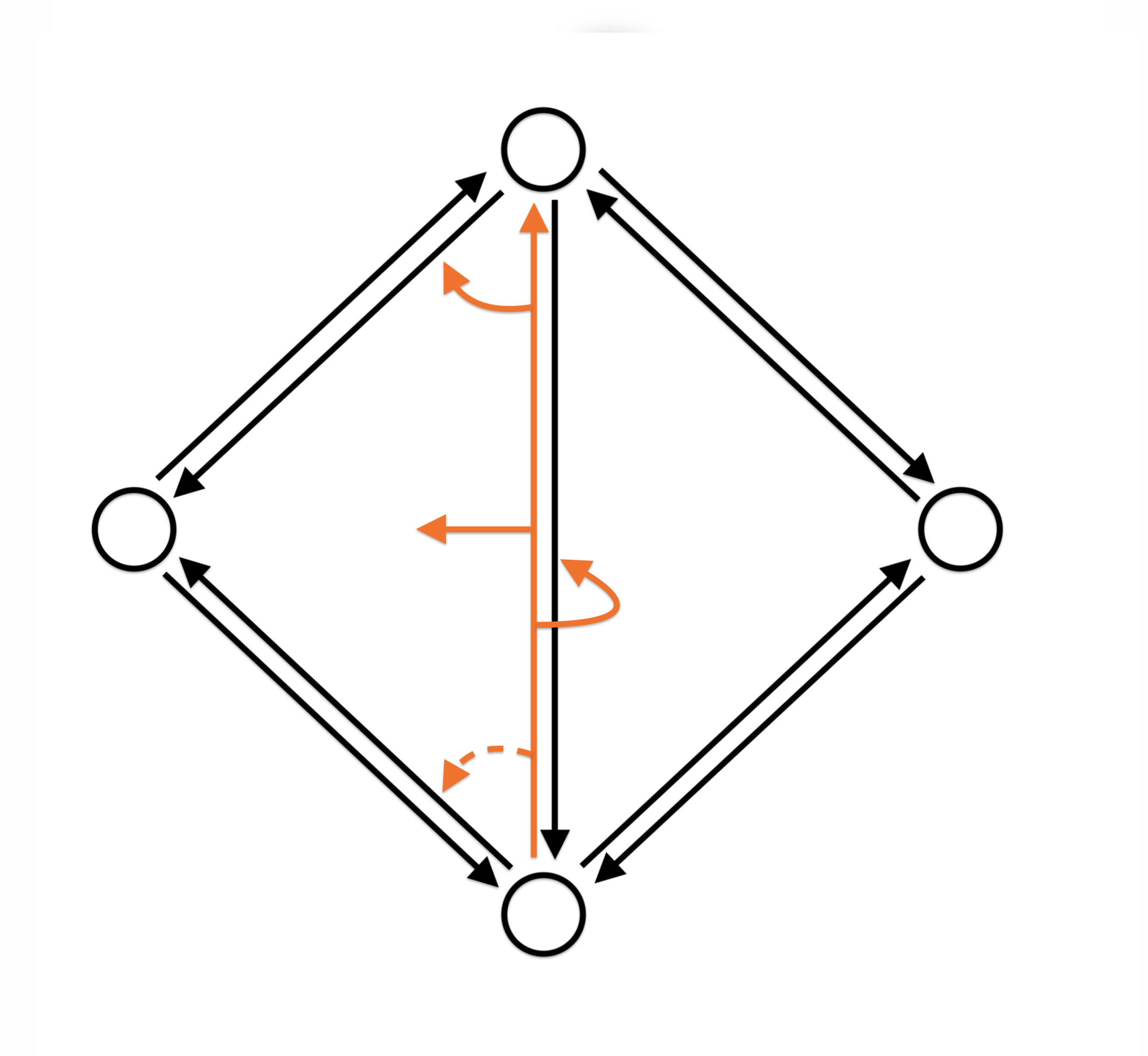
  • Vertex
    • one outgoing halfedge
  • Halfedge
    • to vertex
    • incident face
    • previous/ next/ opposite halfedges
  • Face
    • one incident halfedge
halfedge0.png

Halfedge data structure

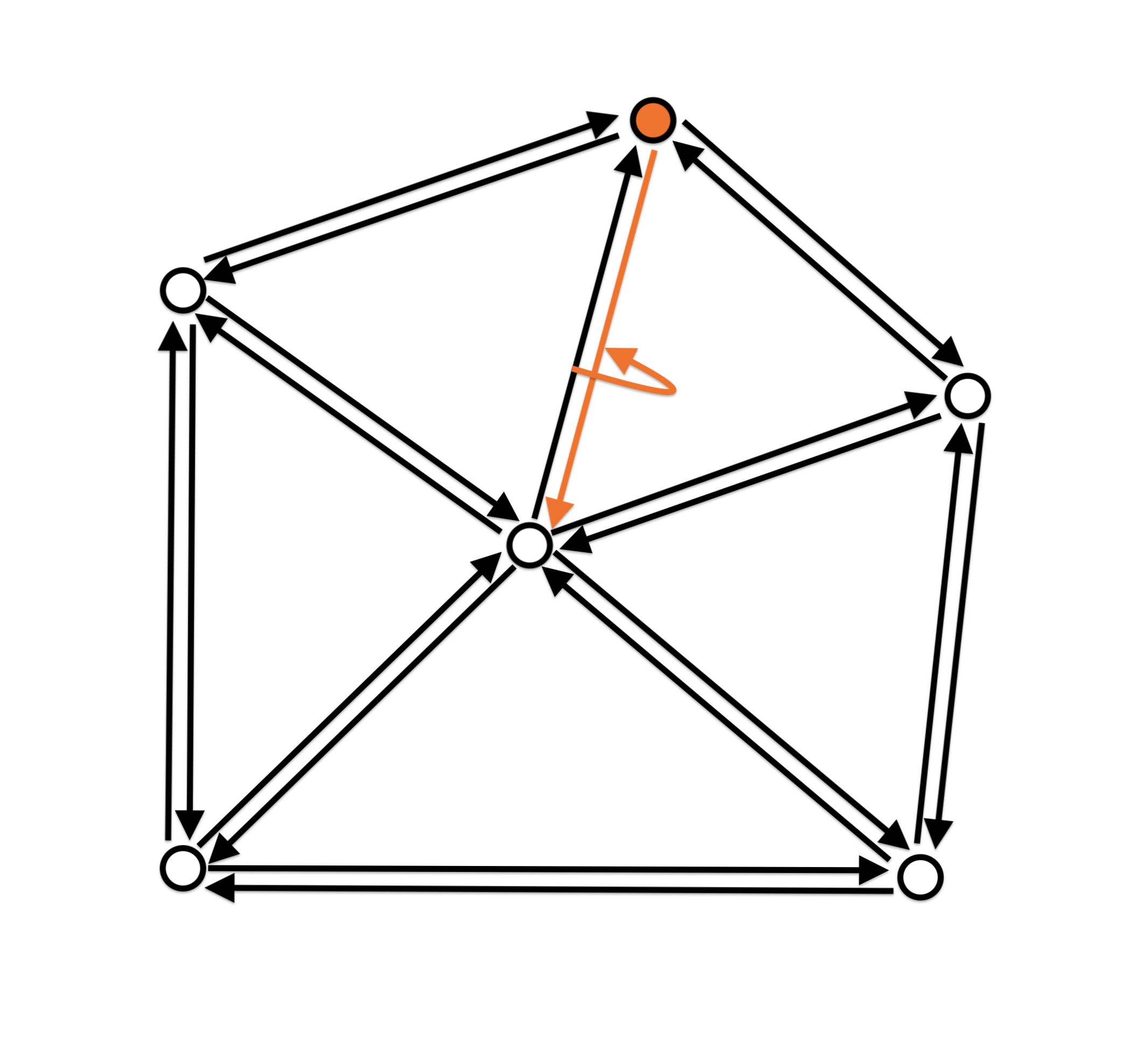
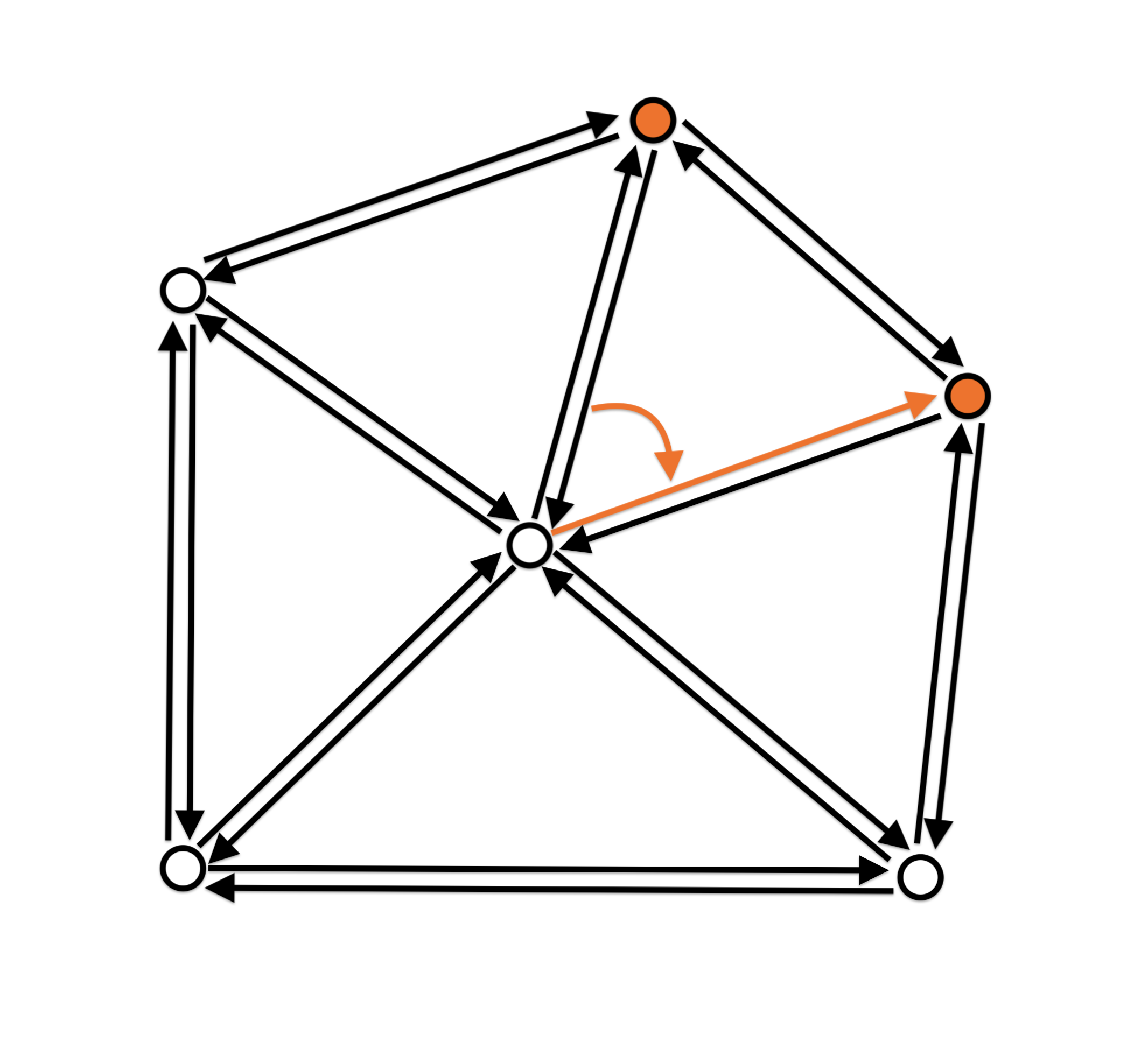
  • One-ring neighbourhood traversal
(1) start at a vertex

Halfedge data structure

  • One-ring neighbourhood traversal
(2) find outgoing halfedge

Halfedge data structure

  • One-ring neighbourhood traversal
(3) switch to opposite halfedge

Halfedge data structure

  • One-ring neighbourhood traversal
(4) next halfedge points to neighbouring vertex

TriMesh definition

  • Define with default traits
  //points, normals in R^3, single precision (floats)
  //colors in N^3 (integer RGB)
  typedef OpenMesh::TriMesh_ArrayKernelT<>  MyMesh;
  MyMesh mesh;
 struct TriTraits : public OpenMesh::DefaultTraits
 {
   /// Use double precision points
   typedef OpenMesh::Vec3d Point;
   /// Use double precision Normals
   typedef OpenMesh::Vec3d Normal;
   /// Use RGBA Color
   typedef OpenMesh::Vec4f Color;
 };
 typedef OpenMesh::TriMesh_ArrayKernelT<TriTraits>  MyMesh; 
 MyMesh mesh;

Mesh creation

  • Adding a vertex
   MyMesh mesh;
   ...
   OpenMesh::VertexHandle vh = mesh.add_vertex(MyMesh::Point(x,y,z));
   //shorter version (using C++11 and assuming that 
   //your Point type can be cast from an initializer-list)
   auto vh2 = mesh.add_vertex({x,y,z});
  • Adding a face
   MyMesh mesh;
   OpenMesh::VertexHandle vh0, vh1, vh2;
   ...
   OpenMesh::FaceHandle fh = mesh.add_face(vh0, vh1, vh2);
   //shorter C++11 version
   auto fh2 = mesh.add_face(vh0, vh1, vh2);
   //NOTE: This automatically adds the relevant edges

Access vertex geometry

  • Reading vertex positions
   MyMesh mesh;
   OpenMesh::VertexHandle vh;
   ...
   MyMesh::Point pos = mesh.point(vh);
  • Modifying vertex positions
   MyMesh mesh;
   OpenMesh::VertexHandle vh;
   MyMesh::Point new_pos;
   ...
   mesh.set_point(vh, new_pos);

Mesh elements traversal

  • How to modify all vertices?
 MyMesh mesh;
 //vertex iterators
 MyMesh::VertexIter v_it, v_begin, v_end;
 //range of iterators
 v_begin = mesh.vertices_begin();
 v_end = mesh.vertices_end();
 //iterate over all vertices
 for(v_it = v_begin; v_it != v_end; ++v_it){
     //get vertex handle
     OpenMesh::VertexHandle vh = *v_it;
     //process the vertex
     DoSomethingWithVertex(vh);
 }
  • In practice, you can us the C++11 “ranged-based for loops”
 MyMesh mesh;
 
 for(auto vh: mesh.vertices()){
    //same loop body
 }

Mesh elements traversal

  • Iterating over all elements
 MyMesh mesh;
 
 for(auto fh: mesh.faces()){
    ...
 }
 for(auto fh: mesh.edges()){
    ...
 }
 for(auto fh: mesh.halfedges()){
    ...
 }

Enumerating incident elements

  • Iterate over all neighbouring vertices
MyMesh mesh;
OpenMesh::VertexHandle vh;
//circulator around a vertex
for(VertexVertexIter vv_it = mesh.vv_iter(vh); vv_it.is_valid(); vv_it++){
    //process vertex neighbor
    do_something_with_vertex(*vv_it);
}
  • Reminder: “one-ring neighborhood”
  • Doc ref: iterators & circulators

Enumerating incident elements

  • The circulators around a vertex are:
  • VertexVertexIter: iterate over all neighboring vertices.
  • VertexIHalfedgeIter: iterate over all incoming halfedges.
  • for(auto vih_it = mesh.vih_iter(v); vih_it.is_valid(); vih_it++){ ... }
  • VertexOHalfedgeIter: iterate over all outgoing halfedges.
  • for(auto voh_it = mesh.voh_iter(v); voh_it.is_valid(); voh_it++){ ... }
  • VertexEdgeIter: iterate over all incident edges.
  • for(auto ve_it = mesh.ve_iter(v); ve_it.is_valid(); ve_it++){ ... }
  • VertexFaceIter: iterate over all adjacent faces.
  • for(auto vf_it = mesh.vf_iter(v); vf_it.is_valid(); vf_it++){ ... }

Enumerating incident elements

  • The circulators around a face are:
    • FaceVertexIter: iterate over the face’s vertices.
    • FaceHalfedgeIter: iterate over the face’s halfedges.
    • FaceEdgeIter: iterate over the face’s edges.
    • FaceFaceIter: iterate over all edge-neighboring faces.

Element count functions

  • Query entity number
MyMesh mesh;
unsigned int n1 = mesh.n_vertices(), 
n2 = mesh.n_faces(),
n3 = mesh.n_edges(),
n4 = mesh.n_halfedges();

Using properties

  • Template based dynamic properties
MyMesh mesh;
//define a property type, e.g edge property in float
typedef OpenMesh::EPropHandleT<float> edge_length;
//add the property to mesh and name it(optional)
mesh.add_property(edge_length, "edge length");
OpenMesh::EdgeHandle eh;
float L, LL;
//write to the property
mesh.property(edge_length, eh) = L;
//read the property
LL = mesh.property(edge_length, eh);
//remove the property
mesh.remove_property(edge_length);

Connectivity Query

  • Getting the connectivity information
MyMesh mesh; 
HalfedgeHandle heh;
VertexHandle   vh_from  = mesh.from_vertex_handle(heh),
VertexHandle   vh_to    = mesh.to_vertex_handle(heh);
FaceHandle     fh       = mesh.face_handle(heh);
HalfedgeHandle heh_next = mesh.next_halfedge_handle(heh);
HalfedgeHandle heh_prev = mymesh.prev_halfedge_handle(heh);
HalfedgeHandle heh_opp  = mymesh.opposite_halfedge_handle(heh);
  • halfedges are at the core of the OpenMesh data structure

Integrated vector operations

  • Using the integrated vector operations
MyMesh::Point x, y, a, b, c, d;
...
//arithmetic operations
a = x + y;
b = x - y;
c = x * 0.5;
d = y / 3.0;
...

Integrated vector operations

  • Using the integrated vector operations
MyMesh::Point x, y, a, b, c, d;
...
//dot product
Scalar dot = OpenMesh::dot(x, y); //Scalar dot = x | y;
//compute the norm
Scalar norm = x.norm();
//normalize 
a = x.normalize();
//cross product 
MyMesh::Point cross = OpenMesh::cross(x, y); //Scalar b = x % y;
...

Other useful functions, thoughts, and reference pages

// Updates face normals and populates them
mesh.update_face_normals();

// Returns normal vector associated with face handle fh
mesh.normal(fh); 

// May specify direction of rotation, e.g., 
for(auto voh_it = mesh.voh_ccwbegin(); voh_it.is_valid(); ++voh_it) {
  ...
}

// See if something is on the boundary
mesh.is_boundary(vh);

Final words

  • There’s a lot of stuff that you can do with OpenMesh
  • It’s normal not to know everything at first
  • Some advice: use auto-completion/suggestions from IDE to see all the available methods
  • Remember to use the official documentation: http://www.openmesh.org